Psychopy & Python Slides
What is it?
Psychopy is a Python package - aka a collection of functions written in Python that you can use to create experiments with high precision

Why should you use it?
- It’s opensource (you can check all the background code here)
- It’s very precise (don’t listen to Eprime users, they’re jealous)
- It’s versatile (key presses, eye-tracking, EEG, webcams, MRI, etc…)
This does not mean you won’t find some difficulties (we’ll come back to this later)
It’s just Python
for thisComponent in introComponents:
    thisComponent.tStart = None
    thisComponent.tStop = None
    thisComponent.tStartRefresh = None
    thisComponent.tStopRefresh = None
    if hasattr(thisComponent, 'status'):
        thisComponent.status = NOT_STARTED
# reset timers
t = 0
_timeToFirstFrame = win.getFutureFlipTime(clock="now")
frameN = -1

# --- Run Routine "intro" ---
while continueRoutine:
    # get current time
    t = routineTimer.getTime()
    tThisFlip = win.getFutureFlipTime(clock=routineTimer)
    tThisFlipGlobal = win.getFutureFlipTime(clock=None)
    frameN = frameN + 1  # number of completed frames (so 0 is the first frame)
    # update/draw components on each frame

    # check for quit (typically the Esc key)
    if endExpNow or defaultKeyboard.getKeys(keyList=["escape"]):
        core.quit()

    # check if all components have finished
    if not continueRoutine:  # a component has requested a forced-end of Routine
        routineForceEnded = True
        break
Packages
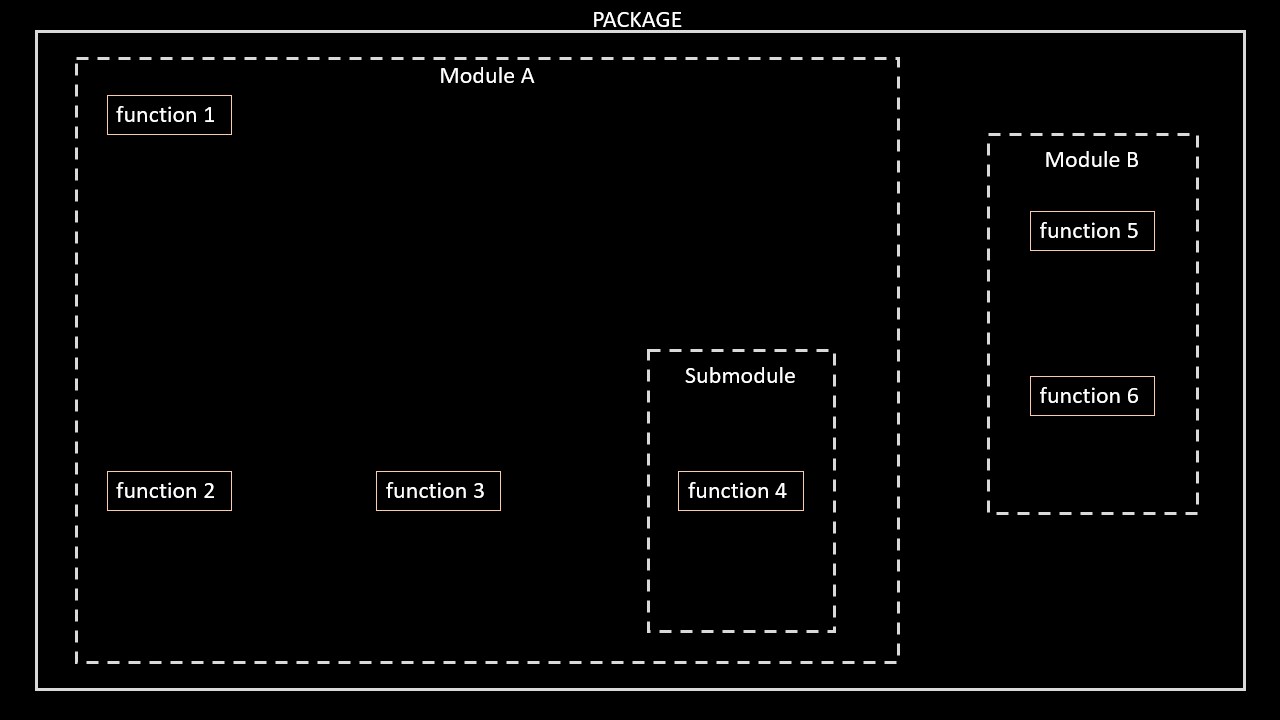
Packages
How to import a function
# We need to load the packages

import packageName #To import the whole package
from packageName import moduleName #To import a module
from packageName.moduleName.subModule import functionName #To import specific function from subModule

# Function in package
packageName.functionName()

# Function in submodule
packageName.moduleName.functionName()
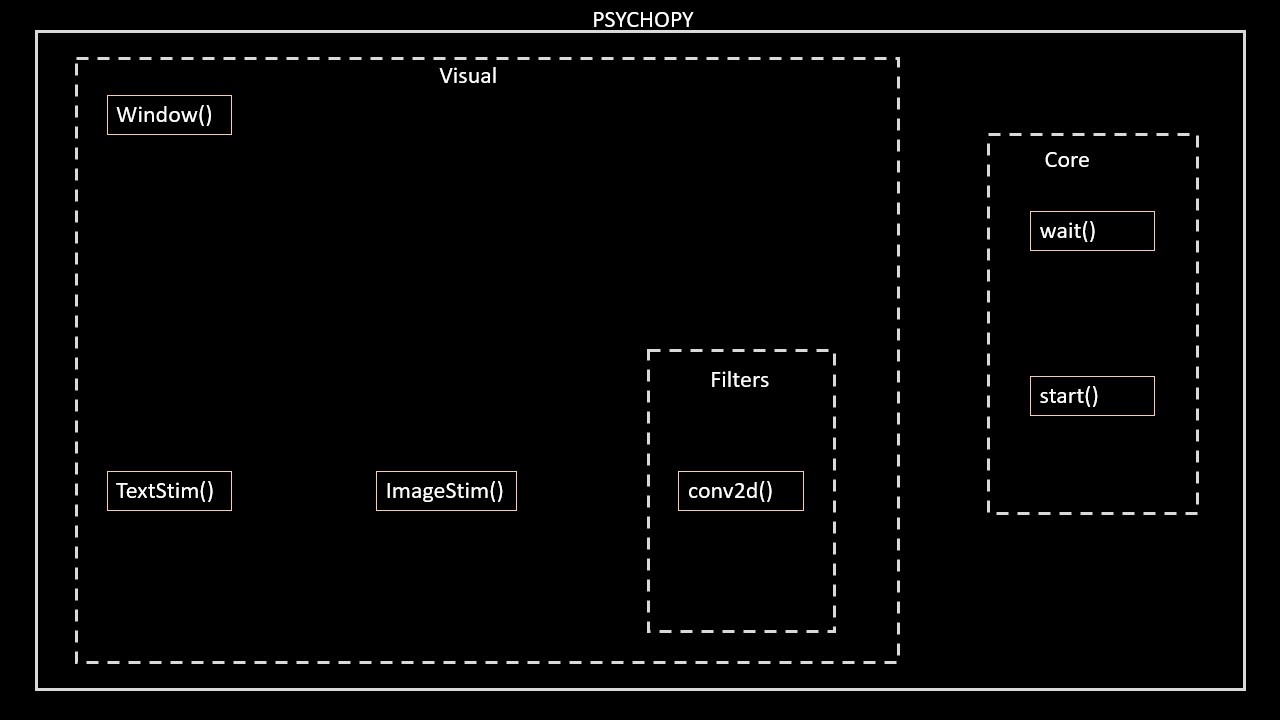
How to import a function
# We need to load the packages
import psychopy #To import the whole psychopy package
from psychopy import visual #To import the submodule package
from psychopy.visual.filters import conv2d #To import the conv2d function from the submodule filters

# Use the win function in Visual module
win = visual.Window(
    size = [500, 500],
    fullscr = False,
    color = [1, 1, 1],
    units = "pix")
We don’t need all of this…just wait
Coding an experiment (kinda)
Creating stimuli
Creating stimuli
Creating stimuli
Why is it not working?
How we draw images
We need to draw the stimulus to the GPU and update the screen
How we draw images
How we draw images
# Import required modules
from psychopy import visual
# Create window
win = visual.Window(
size = [500, 500],
fullscr = False,
color = [0, 0, 0],
units = "pix")
# Create letter R
top_r = visual.TextStim(
win = win,
text = "R",
color = [1, 1, 1],
pos = [0, 0],
height = 50,
)
# Draw stimulus to GPU
top_r.draw()
# Update screen
win.flip()Make the Stimuli last longer
# Import required modules
from psychopy import visual, core

# Create window
win = visual.Window(
    size    = [500, 500],
    fullscr = False,
    color   = [0, 0, 0],
    units   = "pix")

# Create letter R
top_r = visual.TextStim(
    win    = win,
    text   = "R",
    color  = [1, 1, 1],
    pos    = [0, 0],
    height = 50,
    )

# Draw stimulus to GPU
top_r.draw()
# Update screen
win.flip()

# Stop for 5 seconds before doing anything else
core.wait(5)
Make the Stimuli last longer
BUT
core.wait() is a PsychoPy function that doesn’t exist in PsychoJS. Having said that, core.wait() should never be used in a Builder experiment, only in Python scripts that are crafted by hand. Builder scripts are structured around a drawing and event loop that assumes that any code that runs can be completed within one screen refresh (typically at 60 Hz this is 16.666 ms), because Builder is actively drawing to the screen on every refresh, checking for responses and so on, even if stimuli don’t appear to be changing. core.wait() breaks this active drawing cycle and can completely muck up Builder’s internal timing. You should restructure your experiment to avoid core.wait(). The translation to PsychoJS should then hopefully be straightforward.
Make the Stimuli last longer
# Import required modules
from psychopy import visual, core

# Create window
win = visual.Window(
    size    = [500, 500],
    fullscr = False,
    color   = [0, 0, 0],
    units   = "pix")

# Create letter R
top_r = visual.TextStim(
    win    = win,
    text   = "R",
    color  = [1, 1, 1],
    pos    = [0, 0],
    height = 50,
    )

# Time in frames (1 second at 60Hz is 60 frames)
frames = 60
Make the Stimuli last longer
# Import required modules
from psychopy import visual, core

# Create window
win = visual.Window(
    size    = [500, 500],
    fullscr = False,
    color   = [0, 0, 0],
    units   = "pix")

# Create letter R
top_r = visual.TextStim(
    win    = win,
    text   = "R",
    color  = [1, 1, 1],
    pos    = [0, 0],
    height = 50,
    )

# Time in frames (1 second at 60Hz is 60 frames)
frames = 60

# Use frames for presentation
for iFrame in range(frames):
Make the Stimuli last longer
# Import required modules
from psychopy import visual, core

# Create window
win = visual.Window(
    size    = [500, 500],
    fullscr = False,
    color   = [0, 0, 0],
    units   = "pix")

# Create letter R
top_r = visual.TextStim(
    win    = win,
    text   = "R",
    color  = [1, 1, 1],
    pos    = [0, 0],
    height = 50,
    )

# Time in frames (1 second at 60Hz is 60 frames)
frames = 60

# Use frames for presentation
for iFrame in range(frames):

    # Draw stimulus to GPU
    top_r.draw()
    # Update screen
    win.flip()
Can you modify the position of the R?
Modifying the R
# Import required modules
from psychopy import visual, core

# Create window
win = visual.Window(
    size    = [500, 500],
    fullscr = False,
    color   = [0, 0, 0],
    units   = "pix")

# Create letter R
top_r = visual.TextStim(
    win    = win,
    text   = "R",
    color  = [1, 1, 1],
    pos    = [0, 0],
    height = 50,
    )

# Time in frames (1 second at 60Hz is 60 frames)
frames = 60

# Use frames for presentation
for iFrame in range(frames):

    # Draw stimulus to GPU
    top_r.draw()
    # Update screen
    win.flip()
Adding a second R
# Import required modules
from psychopy import visual, core

# Create window
win = visual.Window(
    size    = [500, 500],
    fullscr = False,
    color   = [0, 0, 0],
    units   = "pix")

# Create letter R
top_r = visual.TextStim(
    win    = win,
    text   = "R",
    color  = [1, 1, 1],
    pos    = [0, 150],
    height = 50,
    )

# Create a second R
bottom_r = visual.TextStim(
    win    = win,
    text   = "R",
    color  = [1, 1, 1],
    pos    = [0,-150],
    height = 50,
    )
Adding a fixation cross
Remember to draw and flip!
Make it spin
Let’s make the bottom R rotate at different angles
Make it spin
Let’s make the bottom R rotate at different angles
# Possible angles
angles = [0, 30, 90, 270, 340]
# Loop through angles
for iAngle in angles:
# set the angle for the current presentation
bottom_r.setOri(iAngle)
# Use frames for presentation
for iFrame in range(frames):

    # Draw stimuli to GPU
    top_r.draw()
    bottom_r.draw()
    fixation.draw()
    # Update screen
    win.flip()
Make it spin
Let’s make the bottom R rotate at different angles
# Possible angles
angles = [0, 30, 90, 270, 340]

# Loop through angles
for iAngle in angles:

    # set the angle for the current presentation
    bottom_r.setOri(iAngle)

    # Use frames for presentation
    for iFrame in range(frames):

        # Draw stimuli to GPU
        top_r.draw()
        bottom_r.draw()
        fixation.draw()
        # Update screen
        win.flip()
Make it flip
Let’s flip the bottom R
# Possible angles
angles = [0, 30, 90, 270, 340]
# Is stimulus flipped?
is_flip = [0, 1, 1, 0, 1]

# Loop through angles
for iAngle in angles:

    # set the angle for the current presentation
    bottom_r.setOri(iAngle)
    # Set flip
    bottom_r.flipHoriz = is_flip[iTrial]

    # Use frames for presentation
    for iFrame in range(frames):

        # Draw stimuli to GPU
        top_r.draw()
        bottom_r.draw()
        fixation.draw()
        # Update screen
        win.flip()
Collecting responses…
Add a keyboard component to record key presses
Collecting responses…
Add a keyboard component to record key presses
# Loop through angles
for iTrial, iAngle in enumerate(angles):

    # set the angle for the current presentation
    bottom_r.setOri(iAngle)

    # Set flip
    bottom_r.flipHoriz = is_flip[iTrial]

    # Use frames for presentation
    for iFrame in range(frames):

        # Draw stimuli to GPU
        top_r.draw()
        bottom_r.draw()
        fixation.draw()
        # Update screen
        win.flip()

        # Get key presses
        keys = keyboard.getKeys(['x', 'm'])
…and check answer
    # Use frames for presentation
    for iFrame in range(frames):

        # Draw stimuli to GPU
        top_r.draw()
        bottom_r.draw()
        fixation.draw()
        # Update screen
        win.flip()

        # Get key presses
        keys = keyboard.getKeys(['x', 'm'])

        # Check answer
        if 'm' in keys and not is_flip[iTrial]:
            # Answer is correct = Make Fixation Green
        elif 'x' in keys and is_flip[iTrial]:
            # Answer is correct = Make Fixation Green
        elif 'm' in keys and is_flip[iTrial]:
            # Answer is wrong = Make Fixation Red
        elif 'x' in keys and not is_flip[iTrial]:
            # Answer is wrong = Make Fixation Red
…and check answer
    # Use frames for presentation
    for iFrame in range(frames):

        # Draw stimuli to GPU
        top_r.draw()
        bottom_r.draw()
        fixation.draw()
        # Update screen
        win.flip()

        # Get key presses
        keys = keyboard.getKeys(['x', 'm'])

        # Check answer
        if 'm' in keys and not is_flip[iTrial]:
            fixation.color = [-1, 1, -1]
        elif 'x' in keys and is_flip[iTrial]:
            fixation.color = [-1, 1, -1]
        elif 'm' in keys and is_flip[iTrial]:
            fixation.color = [1, -1, -1]
        elif 'x' in keys and not is_flip[iTrial]:
            fixation.color = [1, -1, -1]
…and check answer
Remember to reset the fixation to white at the beginning of the trial!
# Loop through angles
for iTrial, iAngle in enumerate(angles):

    # Reset fixation colour to white
    fixation.color = [1, 1, 1]

    # Use frames for presentation
    for iFrame in range(frames):

        # Draw stimuli to GPU
        top_r.draw()
        bottom_r.draw()
        fixation.draw()
        # Update screen
        win.flip()

        # Get key presses
        keys = keyboard.getKeys(['x', 'm'])

        # Check answer
        if 'm' in keys and not is_flip[iTrial]:
            fixation.color = [-1, 1, -1]
        elif 'x' in keys and is_flip[iTrial]:
            fixation.color = [-1, 1, -1]
        elif 'm' in keys and is_flip[iTrial]:
            fixation.color = [1, -1, -1]
        elif 'x' in keys and not is_flip[iTrial]:
            fixation.color = [1, -1, -1]
Mental Rotation
Mental Rotation
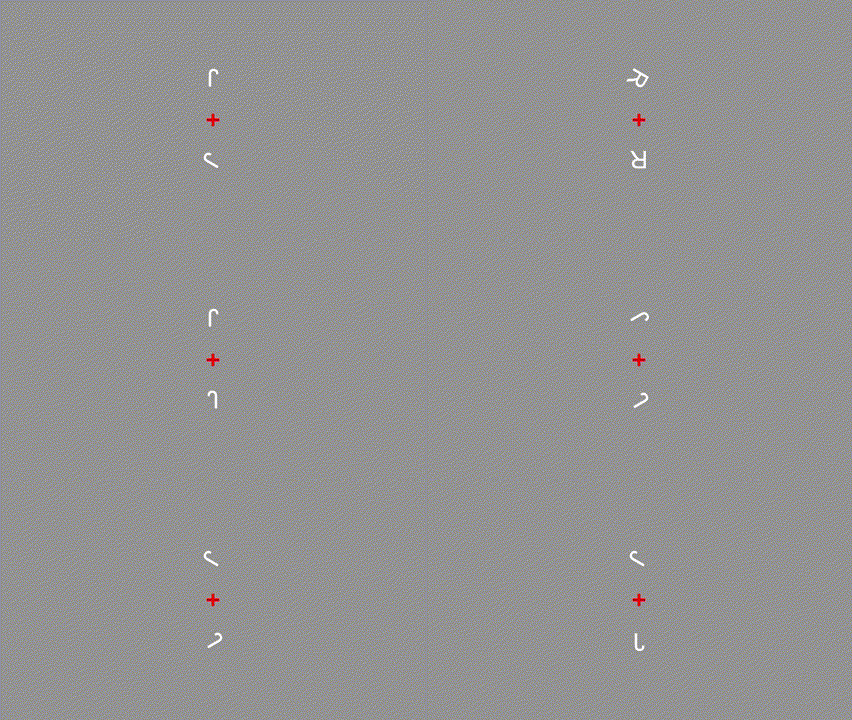
No need to code everything
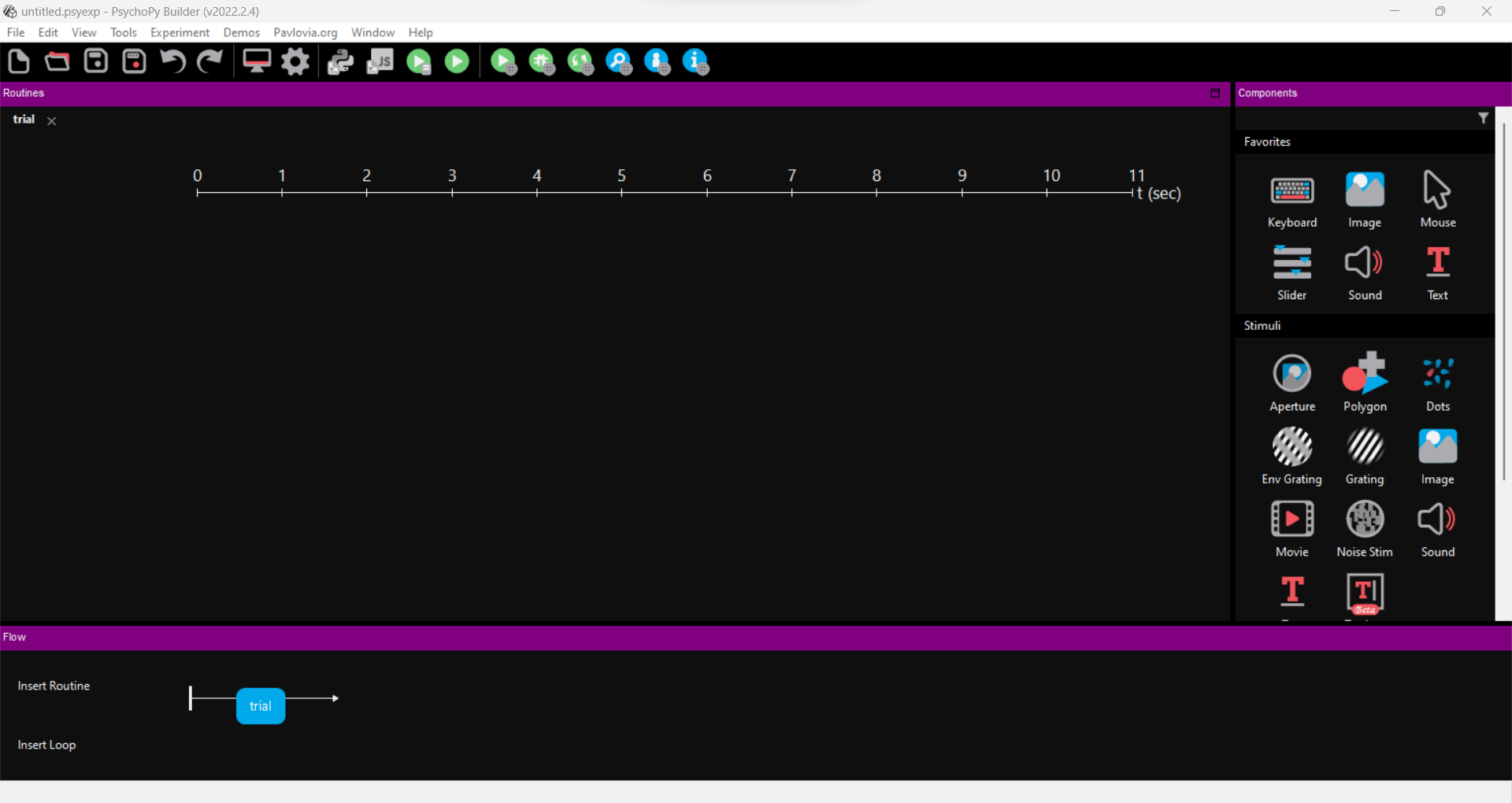
Builder
Builder
Builder
Screen Coordinates
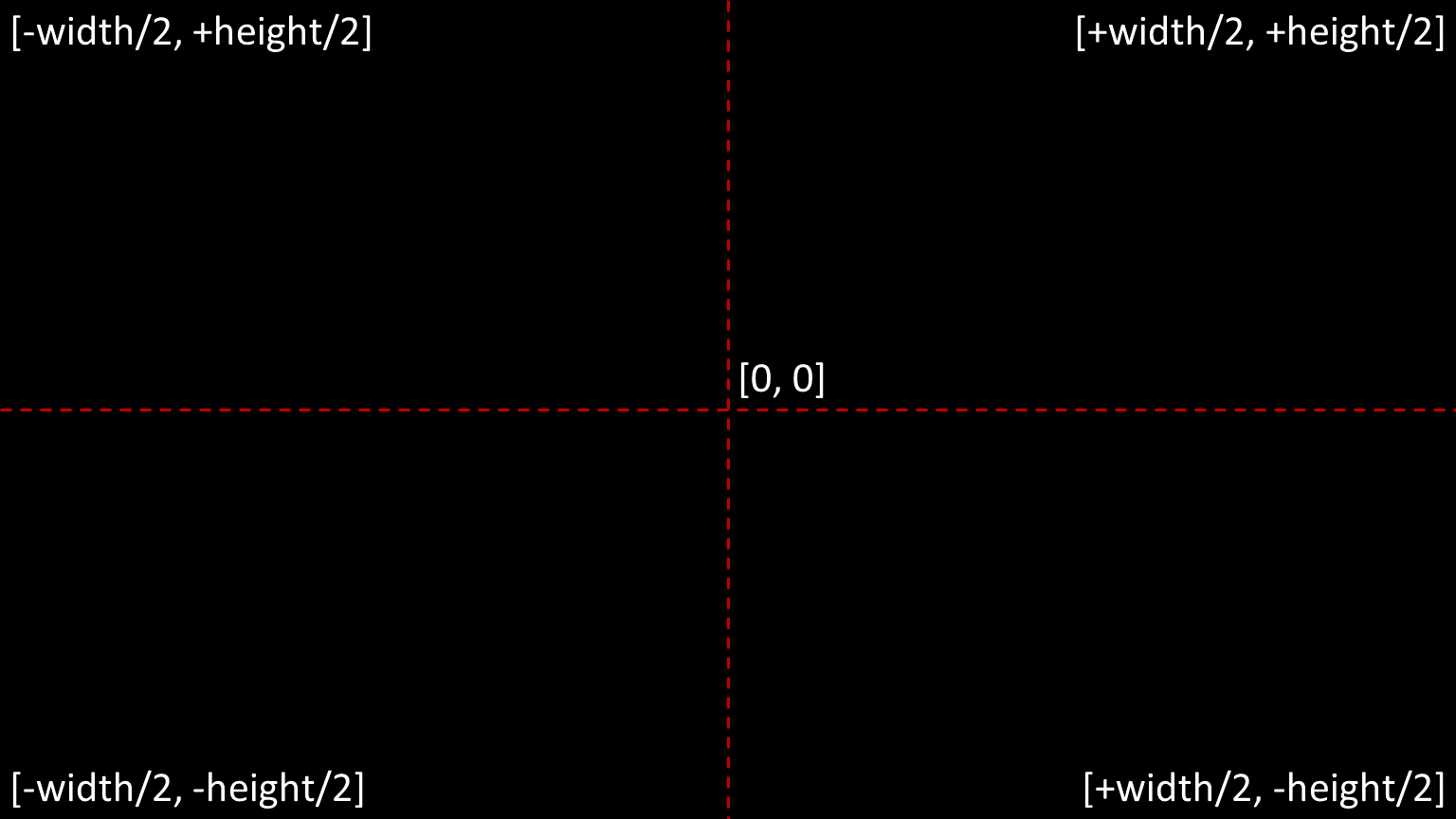
Degrees of visual angle
Why the R disappeared?
Precise timing
How a screen work?
Framerate
- Number of times your screen updates in one second
- Expressed in Hertz (eg. 60Hz = 60 times a second)
- You need to test your PC stability
Framerate
Bugs
Bugs
It could happen that the software you use contains a bug. Thankfully, we are using an opensource software, so we can check the problem, find a solution and even provide this solution to other people!
Bugs
We add a code component to the trial routine. The code goes in the begin routine tab of the component
# Fix the bug
if flip_condition == 'horiz':
    letter.flipHoriz = True
    letter.flipVert = False
else:
   letter.flipHoriz = False
   letter.flipVert = False
Solution taken from here